
To submit an idea in SilkFlo, describe the problem in a sentence or two in the AI Opportunity Finder (or click Submit Idea), answer a few short questions, and submit. SilkFlo scores it straight away. The AI ties your idea to a Value Driver, asks only the questions that fit, and builds a first estimate of what it’s worth, usually in a couple of minutes.
The part only you can supply is the knowledge of where time and effort actually go. The more specific you are about that, the better the estimate.
How to describe your idea well #
The AI fills in more, and asks you less, when your description covers four things:
- Who does the work, and how many of them.
- What they do, step by step if it’s short.
- How often it happens: per day, week or month.
- How long each one takes, or what it costs.
Compare “automate invoices” with “Our 4-person AP team keys around 300 supplier invoices a week into SAP, about 6 minutes each.” The second gives SilkFlo enough to estimate hours saved without asking you anything else.
Two ways in #
1. The AI Opportunity Finder. On your Personal Dashboard, describe your idea in a sentence or two, whether it’s an automation, a GenAI agent or a new workflow, and click Generate Idea. SilkFlo turns it into a structured, scored idea. It’s the fastest way in, and it’s available to everyone. Not sure where to start? Click one of the example prompts above the box.
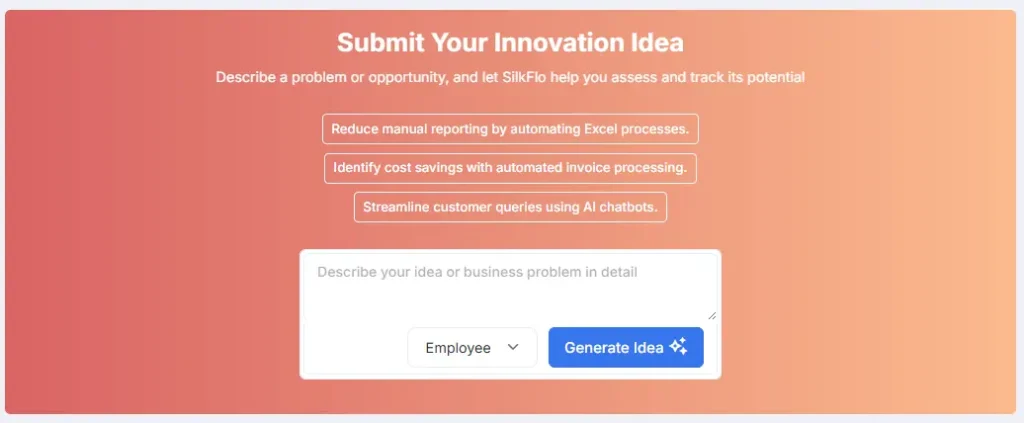
2. The Submit Idea button. In the side menu, available from anywhere in SilkFlo and to everyone. Handy if you’re in Explore or a dashboard and don’t want to go back to your Personal Dashboard. Same result, step by step from a blank start.

Both routes take you to the same place. What happens next depends on your role, not which button you clicked:
- Standard Users (and other roles without Submit CoE Driven Ideas) go through a short, four-phase guided form.
- Authorised Users, Program Managers and Account Owners can use the guided form or go straight into a full Smart Assessment. The Smart Assessment (labelled CoE Idea) is the default for these roles, but you can pick either route.
See Understanding User Roles in SilkFlo.
Solution Blueprints on the Personal Dashboard are reviewed by the Account Owner: click ✓ to approve a blueprint so Admins can see it, or reject it.
Understand Value Drivers first #
Every idea is tied to one or more Value Drivers, the outcome it’s aiming for:

- Productivity & Automation Improvement
- Cost Reduction
- Revenue Growth
- Customer Experience & Improvement
- Compliance and Risk Mitigation
- Employee Experience and Retention
Your Value Driver isn’t just a label. It decides which follow-up questions you’re asked and which formula SilkFlo uses to forecast the business case. A Cost Reduction idea is asked about labour hours and process volume. A risk idea is asked about the cost and likelihood of the event it prevents. You don’t need to know the maths. Tell SilkFlo the outcome you’re after and it asks the right questions.
The guided form #
Available to: everyone
Starting from the AI Opportunity Finder #
Type your idea and click Generate Idea. SilkFlo reads your description, works out the likely Value Driver, and opens the form with as many fields filled in as it can. Step through the four phases, correcting or adding anything it missed.
Starting from Submit Idea #
You walk through the same four phases from a blank start.
Phase 1: The Spark #
Give your idea a name and a short description. There’s an Enhance with AI button in the summary box if you want help sharpening the wording. Then check your Value Driver: SilkFlo’s AI suggests the most likely driver or drivers from your description. Change them if they’re wrong.
Phase 2: Context & Team #
Choose the Business Unit and Area the idea affects, then assign a Process Owner. Add any collaborators here too. Each person gets a collaborator role from your organisation’s list, with a tooltip explaining what that role can see and do. See Understanding User Roles in SilkFlo.
Phase 3: Impact Details #
A short set of questions tailored to your Value Driver. Each one has three clear options side by side, so you pick a category instead of guessing an exact number.
Phase 4: Value Review #
Before you submit, you see your idea’s first scores, so you get feedback on its potential before it reaches the review team. See The Potential Score: how SilkFlo ranks new AI ideas.
Submit, and you land on a success screen with a one-click Return to Dashboard.
Not finished? Click Save as Draft at any point to pick it up later without submitting it for review.
What happens next #
- Your idea is scored straight away.
- It gets its own profile page, where you and your colleagues can track progress, add comments and watch it move through the pipeline.
- Your review team is notified automatically.
- It starts in the Review stage.
- You can see it any time on your Personal Dashboard (under My Innovation Journey) or in Explore > Ideas.
The Smart Assessment #
Available to: Authorised User, Program Manager and Account Owner
Built for business analysts, process owners and consultants who want a fuller case upfront, without waiting for a second review pass. (You may see it called the Full Assessment.) Ideas submitted this way skip the Review stage and go straight to Assess.
Starting from the AI Opportunity Finder #
- Click Generate Idea. You go straight to the Smart Assessment page. Fields fill in live (name, summary, pain points, impact), each flagged with a ✦ AI suggested badge. Edit anything and the badge changes to show you’ve changed it.
- If your description didn’t give SilkFlo everything it needs, a short card asks one to three plain-English questions, such as “How many people currently do this task?” Answer what you can, or click Skip for now. Simple ideas often skip this step.
- As your answers land, the ROI sidebar updates live and finishes with your headline number, estimated hours saved and a confidence rating (High, Medium or Low). The rating shows how confident SilkFlo is in the fields its AI filled in for you.
Starting from Submit Idea #
Fill in the assessment yourself. Every idea starts with the same core details: name, summary, Business Unit, Location, Process Owner, Collaborators and Applications Used. Then the questions adapt to the Value Driver you picked, so you only answer what’s relevant. For the full list of questions per Value Driver and how the value is calculated, see The Smart Assessment: how SilkFlo calculates AI and automation ROI.
Not finished? Click Save as Draft at any point.
What happens next #
- Fuller scoring the moment you submit.
- A profile page where you and your colleagues can track progress, add comments and watch it move through the pipeline.
- Straight to Assess. No Review stage, because the groundwork is done.
- Visible any time on your Personal Dashboard or in Explore > Ideas.
FAQs #
How do I submit an idea in SilkFlo? #
Describe it in a sentence or two in the AI Opportunity Finder on your Personal Dashboard and click Generate Idea, or click Submit Idea in the side menu. SilkFlo fills in what it can and asks a few short questions to build the forecast.
Do I need to calculate the ROI of my idea? #
No. Answer a few plain-English questions, such as how many people do the task and how often. SilkFlo works out the forecast.
Can I save an idea and finish it later? #
Yes. Click Save as Draft at any point. Drafts show on your Personal Dashboard under My Innovation Journey.


